

![Getting Organized Quick Tip #6: How To Never Forget a Birthday or Anniversary [For Outlook Users]](https://www.getorganizedwizard.com/wp-content/uploads/2009/08/image40.png "Getting Organized Quick Tip #6: How To Never Forget a Birthday or Anniversary [For Outlook Users]") Can’t for the life of you remember important dates?
Can’t for the life of you remember important dates?
Always in trouble for having no gift/card/ excuse on that special day?
If you’re an Outlook user, this Get Organized Quick Tip will give you peace of mind – as well as getting you out of the doghouse and into the good books.
Getting Organized Quick Tip #6: How To Never Forget a Birthday or Anniversary
In a previous Get Organized Quick Tip we learned How To Schedule Personal & Household Reminders.
This is a similar process, but uses appointments rather than tasks, and has a few extra steps.
1. Open a new appointment in Outlook
2. Enter the appointment subject
EG:
- Mary’s Birthday
- Wedding Anniversary
3. Tick ‘All day event’
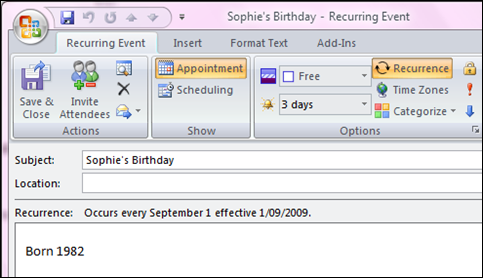
4. Set the recurrence
Click the recurrence button. An appointment recurrence box will open. Select the yearly recurrence pattern.
5. Set a reminder
Click the drop-down reminder list (there’s a bell at the left). Choose a duration that allows you enough days to buy a gift, organize a party or whatever this occasion calls for.
6. Add relevant notes
If it’s a child’s birthday or anniversary, you may want to note the birth or wedding year.
7. Save and close
Now repeat the process for all the dates you want to remember.
Then you can enjoy the shock and wonder of friends and family, as you face each future event well prepared with gift and good wishes. 
To leave a comment: Scroll to the bottom of this post – a comment box is waiting for you.
Did you like this post? Please social bookmark it using the buttons below.
Image: http://www.flickr.com/photos/monstershaq2000/ / CC BY 2.0

You want to be made in Indian style with Indian spices and ingredients at home. You like a super delicious dish of Kadhi recipe, Rava Dosa recipe, Dum Aloo Paratha recipe. On GIforU, how to make recipe of Kadhi, Rava dosa, dum aloo paratha recipes?
RT @MicheleConnolly: ★Getting Organized Quick Tip #6: How To Never Forget a Birthday or Anniversary [Outlook Users]★ http://is.gd/2qftX
Getting Organized Quick Tip #6: How To Never Forget a Birthday or Anniversary [Outlook Users] http://viigo.im/0DIU