
Can’t remember the last time you changed the toothbrush heads? Forgotten how often you’re supposed to decalcify the coffee machine? Got a niggling feeling you’re wa-hay overdue for a dental checkup?
An excellent personal organization strategy that helps to simplify your life is to get as much stuff out of your head as you can.
If you use Outlook, this Get Organized Quick Tip will help you stay on top of recurring tasks and appointments – without wasting one iota of precious headspace.
Getting Organized Quick Tip #5: How To Schedule Personal & Household Reminders
Here’s how:
1. Open a new task in Outlook
2. Enter the task name
Perhaps:
- Change toothbrush heads
- Decalcify coffee machine
- Schedule dental visit
3. Set the start date
This will be today if you’re doing the task today.
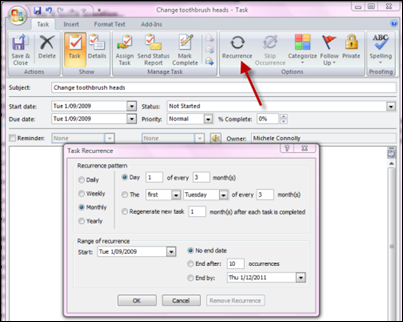
4. Set the recurrence
Click the recurrence button. (See the helpful red arrow in the screenshot above.)
A task recurrence box will open. Select the recurrence pattern you want.
Because the experts say you should change your toothbrush every three months, I’ve set the task to recur every three months from 1 September.
5. Save and close
It’s that simple!
Now repeat the process for all those pesky household and personal tasks you can never remember to do. And let Outlook remember for you. 🙂
To leave a comment: Scroll to the bottom of this post – a comment box is waiting for you.
Did you like this post? Please social bookmark it using the buttons below.

Hi Michelle, I love the features of Outlook, they make life so much more organised. However, I am now using a Mac so am wondering if there is an equivalent software you would know? Thanks.
@Jesse: That sounds like a good idea for a blog post! I’ll keep it in mind. 🙂
Now I just need that list of things to set reminders for! LOL
@Moira: Isn’t it great having all those little things out of your head – and in iCal? It frees your mind for more interesting things! 🙂
I’ve done this in iCal on the Mac. I figured out how often to do various household tasks and then entered them in. Works like a charm. No more having to think about when to flip the mattress, or dust the baseboards. The only challenge is to check iCal every day. 🙂 And the beauty of it, of course, is that if you miss one rotation it’s not serious because you know it will come round again.
Pingback: How To Schedule Personal & Household Reminders | Productivity Hacks
Reading: "Getting Organized Quick Tip: How To Schedule Personal & Household Reminders | Get Organized Wizard" (http://twitthis.com/zmyb3k)
Reading: "Getting Organized Quick Tip: How To Schedule Personal & Household Reminders | Get Organized Wizard" (http://twitthis.com/zmyb3k)